
Your traffic looks solid, but conversions? Not so much. That beautifully designed homepage isn’t turning visitors into customers, and you’re left wondering what’s going wrong.
Traditional analytics tell you what happened, but they can’t show you why. That’s where heatmaps come in. These visual tools reveal exactly how people interact with your site such as where they click, scroll, and lose interest; so you can pinpoint what’s helping (or hurting) conversions.

What Exactly Is Heat Mapping?
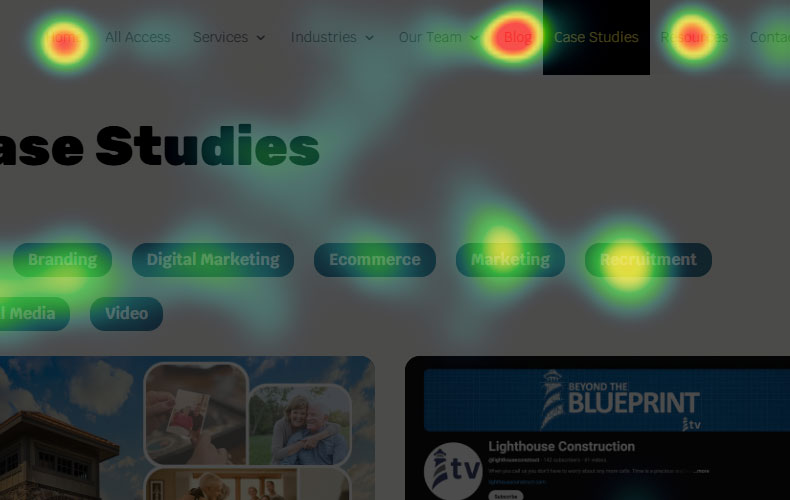
Heat mapping is like giving your website x-ray vision. These tools track where visitors click, how far they scroll, and where their mouse hovers. The data appears as a color-coded overlay on your pages. Depending on which heat mapping tools you use:
Red and Orange
High activity and engagement.

Blue and Green
Low interaction zones.

Think of heatmaps as a behind-the-scenes look at user behavior. Instead of guessing why no one clicks your call-to-action, you can see exactly where attention goes and what’s stealing the spotlight. You’ll uncover which elements visitors try to click (even if they aren’t clickable) and spot the “hot zones” where people are most engaged. These insights reveal precisely where users take action or where they’re dropping off.
Reading Your Heatmap Data Like a Pro
When you first look at your heatmap data, it might feel overwhelming. Here’s how to make sense of what you’re seeing:
High-activity areas (red/orange zones) show where people are most engaged. If these align with your important elements, you’re on the right track. If not, you’ve got some work to do.
Cold spots (blue/green areas) indicate elements that aren’t getting attention. This could mean they’re not compelling enough, poorly placed, or simply not visible to your audience.
Unexpected click patterns often reveal the biggest opportunities. If people are clicking on non-clickable elements, they’re expecting functionality that isn’t there.
Scroll patterns show how far users scroll by using color gradients. Areas with red means most users saw that section, blue means few did. A sharp shift to cooler colors reveals where attention drops off, helping you spot your effective fold and reposition key content above it to keep users engaged.
Optimizing Your Funnel Based on Heatmap Insights
Once you’ve got your data, it’s time to make some changes. Here are the most impactful optimizations you can make:
Move important elements to hot zones. If your heatmap shows people spending time in the upper right corner, but your call-to-action is buried in the lower left, you know what to do.
Simplify cluttered areas. Too many competing elements can confuse visitors. If your heatmap shows scattered clicking patterns, consider removing or consolidating some page elements.
Extend engaging content. If people are scrolling past your main message, consider expanding that section or moving key information higher up the page.
Fix false clickables. When people click on images or text that look clickable but aren’t, it creates frustration. Either make these elements functional or change their design to avoid confusion.
Common Heatmapping Mistakes to Avoid
Don’t make decisions based on tiny sample sizes. You need at least 100-200 page views for scroll heatmaps and several hundred for reliable click data.
Avoid obsessing over every single click. Focus on patterns and trends rather than individual user behavior. One person clicking randomly doesn’t represent your entire audience.
Remember that heatmaps show correlation, not causation. Just because an area gets lots of clicks doesn’t automatically mean it’s driving conversions. Always tie your heatmap insights back to your actual business metrics.
Measuring Success and Iterating
The real power of heat mapping comes from continuous improvement. Set up a regular review schedule (monthly or quarterly works well for most businesses). Track how your changes impact both user behavior and conversion rates.
Create a simple before-and-after comparison for your key pages. Document what changes you made and how they affected user interaction patterns. This builds a valuable playbook for future optimizations.
Don’t try to fix everything at once. Make one significant change at a time, let it run for a few weeks, then measure the impact before moving on to the next optimization.
Turn Your Heatmap Data Into Real Results
Seeing the problems in your heatmaps is one thing – fixing them is another. At Absolute Studios, we specialize in turning user behavior insights into websites that actually convert.